



Download Mac OS X Lion – Mac OS X Lion wallpaper pack, Mac OS X Lion download, Mac OS X Lion update, Mac OS X Lion features, Mac OS X Lion wallpaper
Overview
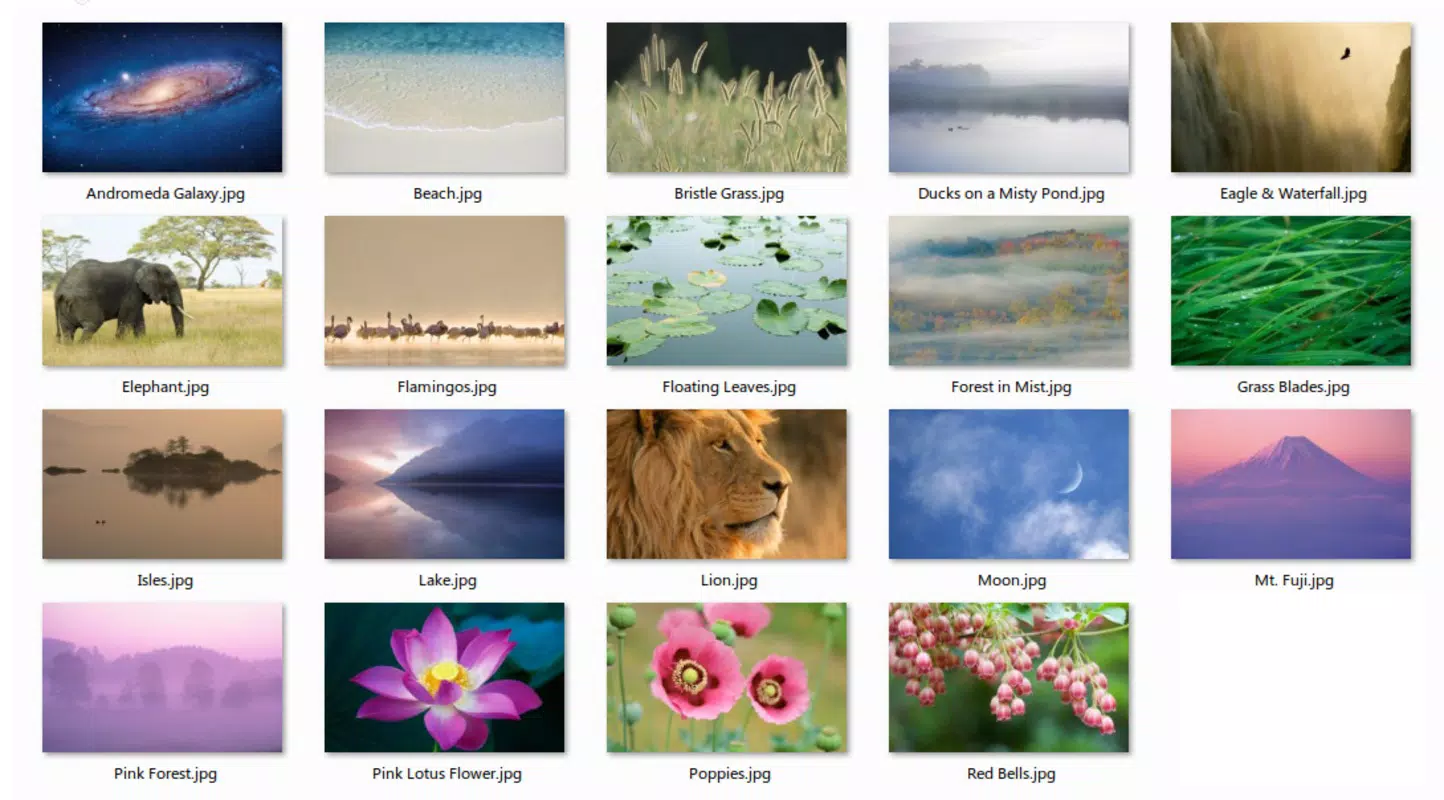
Mac OS X Lion, released on June 11, 2011, represents a significant evolution in Apple’s desktop operating system, introducing a suite of user-centric enhancements designed to elevate both functionality and visual appeal. At its core, the operating system aims to modernize the Mac experience by integrating intuitive design principles, improved multitasking capabilities, and a refined interface. One of the standout features of Mac OS X Lion is the availability of a dedicated wallpaper pack, which allows users to preview and enjoy high-quality visual themes inspired by nature, space, and diverse landscapes prior to the full OS rollout. This early access to aesthetic elements serves as both a teaser and a functional enhancement, enabling users to personalize their desktop environment immediately.
The target audience includes Mac users seeking a more immersive and visually engaging computing experience, particularly those who value design aesthetics and productivity improvements. While the operating system itself is no longer actively updated, its legacy continues to influence modern macOS features. Apple, as the developer, has historically emphasized seamless integration between software and hardware, and Mac OS X Lion reflects that philosophy through its focus on responsiveness and user experience. Real-world use cases include creative professionals who benefit from enhanced window management and multitasking tools, as well as everyday users who appreciate a polished, modern interface. In the broader app ecosystem, Mac OS X Lion marked a pivotal moment in Apple’s transition toward a more touch-friendly, visually rich operating system, laying the groundwork for future innovations.
Key Features & Functionality
- Wallpaper Pack Access: Users can download a curated collection of high-resolution wallpapers themed around nature, space, and landscapes. This feature allows immediate desktop personalization without waiting for the full OS installation.
- Enhanced Multitasking Tools: Mac OS X Lion introduces Mission Control, which consolidates full-screen apps, spaces, and window management into a single, intuitive interface. This streamlines navigation and improves workflow efficiency.
- Improved Window Management: Features like Launchpad and full-screen applications enable users to organize and access apps and documents more efficiently, reducing clutter and enhancing focus.
- Touch-Driven Interface Elements: Drawing inspiration from iOS, Lion incorporates gesture-based navigation, including swipe gestures for switching between apps and spaces, improving interaction speed and intuitiveness.
- Visual Customization Options: The inclusion of diverse thematic wallpapers ensures users can align their desktop environment with their personal style or mood, whether seeking serenity from natural scenes or wonder from cosmic imagery.
These features collectively support real-world workflows such as content creation, project management, and daily computing. For example, a graphic designer might use the full-screen mode to focus on a single project while switching between tasks using Mission Control. Similarly, a student could leverage the Launchpad to quickly access study tools without navigating through multiple folders. The integration of iOS-inspired gestures also benefits users familiar with touch interfaces, offering a more fluid experience on compatible hardware.
Interface, UX & Performance
Mac OS X Lion features a clean, minimalist interface with a focus on visual clarity and ease of navigation. The design language emphasizes depth, transparency, and subtle animations, contributing to a modern and immersive user experience. Navigation is streamlined through centralized hubs like Launchpad and Mission Control, reducing the need for complex menu hierarchies. The layout prioritizes accessibility, with intuitive icon placement and consistent visual feedback across interactions.
Although the developer did not list formal performance metrics, the operating system was optimized for the hardware available at the time of release, including Intel-based Macs. Users reported smooth responsiveness in daily tasks, with minimal lag during window transitions and app switching. Stability is generally consistent across supported devices, though performance may vary depending on hardware specifications such as RAM and processor speed. The interface remains responsive even when multiple full-screen applications are active, thanks to efficient memory management and graphics acceleration.
While the operating system is no longer supported with updates, its interface remains functional and usable on compatible Mac models. The use of animations and visual effects enhances perceived performance, giving users a sense of fluidity even on older hardware. Overall, the UX reflects Apple’s commitment to balancing aesthetic elegance with practical usability, making it accessible to both novice and experienced users.
Platform Compatibility & Technical Requirements
Mac OS X Lion is designed for Apple’s Mac OS X platform and requires version 10.7 or later. The installation file size is 3.2 GB, which reflects the comprehensive nature of the operating system update. Compatibility with specific Mac models was limited to those released after 2007, including MacBook, MacBook Pro, iMac, Mac mini, and Mac Pro systems that support Intel processors.
The developer did not specify minimum OS requirements beyond version 10.7. Similarly, no detailed hardware specifications such as RAM or storage space were provided. Users are advised to ensure their system meets the baseline compatibility criteria before attempting installation. While the operating system is free to download, the installation process may require a stable internet connection and sufficient disk space for both the download and post-installation files.
Pros and Cons
Pros
- High-quality, thematic wallpaper pack available for immediate desktop customization.
- Intuitive interface with gesture-based navigation inspired by iOS.
- Enhanced multitasking through Mission Control and full-screen applications.
- Free to download and install, offering significant value for users upgrading from older OS versions.
- Consistent visual design language with transparency, depth, and smooth animations.
Cons
- Not compatible with Mac models released before 2007.
- Operating system is no longer supported or updated by Apple.
- Requires a substantial 3.2 GB of disk space for installation.
- Limited availability of modern software and security updates due to end-of-life status.
- May experience performance issues on older or underpowered hardware.
FAQ
Is Mac OS X Lion still safe to use?
While Mac OS X Lion was secure at the time of its release, it is no longer supported by Apple. This means no security updates or patches are provided, making it less secure for modern internet use.
Can I install Mac OS X Lion on any Mac?
Compatibility is limited to Mac models released after 2007 that support Intel processors. Older Macs may not meet the minimum hardware requirements.
How do I download Mac OS X Lion?
Mac OS X Lion was originally distributed via the Mac App Store. However, due to its age, it may no longer be available for download through official channels.
Is the wallpaper pack included in the full OS download?
Yes, the wallpaper pack is part of the full Mac OS X Lion installation. It is not available as a standalone download from official sources.
Can I update Mac OS X Lion to a newer version?
Yes, users can upgrade to newer versions of macOS, provided their Mac model supports them. However, this requires a clean installation or a system upgrade from a compatible previous version.
Final Thoughts
Mac OS X Lion remains a landmark release in Apple’s operating system history, blending aesthetic refinement with practical enhancements. Its innovative features—such as Mission Control, Launchpad, and gesture-based navigation—set a new standard for desktop usability and visual design. The inclusion of a premium wallpaper pack adds an immediate layer of personalization, allowing users to transform their desktops with nature, space, and landscape themes. While the operating system is now outdated and unsupported, its influence persists in modern macOS versions.
For users with compatible hardware, Mac OS X Lion offers a rich, immersive experience that balances beauty and functionality. It is particularly beneficial for those who appreciate a polished interface and advanced multitasking tools. Despite its limitations, the value lies in its historical significance and enduring design principles.
Download Mac OS X Lion now


